Release Notes: Audit Paperwork Status Tracking in Triumph Payments Portal
Release Date: May 2026
Product: Triumph Payments
Audience: Broker customers of Triumph Audit & Payments
Overview
The Triumph Payments portal now allows carriers to view paperwork received and processed in Triumph Audit. In addition to paperwork and the corresponding simplified status, a new global search functionality has been introduced for carriers.
Background
Carriers that login to the Triumph Payments portal currently see paperwork they have submitted via the Payments Portal. After this change, paperwork that has been submitted through other sources that exist in Triumph Audit will also be available. This self-service visibility will result in a reduction of payment inquiries and escalation calls and reduce operational workloads.
Key Features
Paperwork Status Checks: Brokers that leverage Triumph’s Audit and Payments platform can be confident that Triumph is providing a full picture to carriers about their loads, paperwork and invoice status.
Global Search: This search tool provides quick access across paperwork, invoices, and payments records for users to quickly find the information they are looking for. This feature provides an essential layer of self-support ability to help carriers get the answers to their questions without contacting support.
Getting Started
This feature is available to the carriers of all Bundled (Audit + Payments) brokers and is enabled by default in account settings in the Triumph Network.
User Experience
PLEASE NOTE: This is a feature specific to the carrier experience in the Triumph Payments Portal. Brokers will not see these changes in their Payments experience.
For Your Carriers:
Triumph will notify all carriers of the new feature via email communication and in-app guided walkthroughs.
Carriers will have the ability to see a full picture of their paperwork, invoices, and payments status and will have a new global-search function.
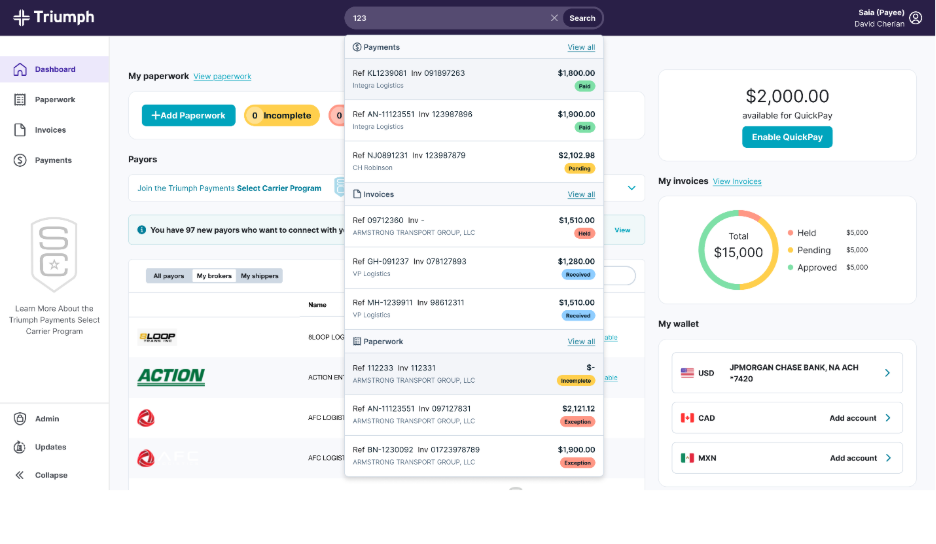
This is a high-fidelity mockup for demonstration purposes only. It may not be reflective of the final result.
Internal Users (Brokers/Admins):
- Enable and configure the QuickPay restriction directly within your payor-level settings.
- Easily monitor the status of new carriers and their progress toward meeting the invoice threshold.
- Maintain the flexibility to make exceptions for trusted carrier partners on a case-by-case basis.
Paperwork Status Meanings
Status | What it means |
Submitted | Carrier has uploaded your paperwork from the paperwork portal and it is being processed |
Delivered | Carrier paperwork has been received and indexed by the broker through any one of their submission channels |
Exception | There is an issue that may require review or action |
Approved | Paperwork is approved and moving forward for payment |
Incomplete | Carrier has paperwork that has yet to be submitted currently in the paperwork portal |
Statuses are updated automatically based on audit activity, so the portal always reflects the most recent update.
What do ‘Exceptions’ mean?
Carriers will see simplified exception messages when there is missing documentation on an invoice and they can take action to resolve. For example:
“No Proof of Delivery found.”
“No Rate Confirmation found.”
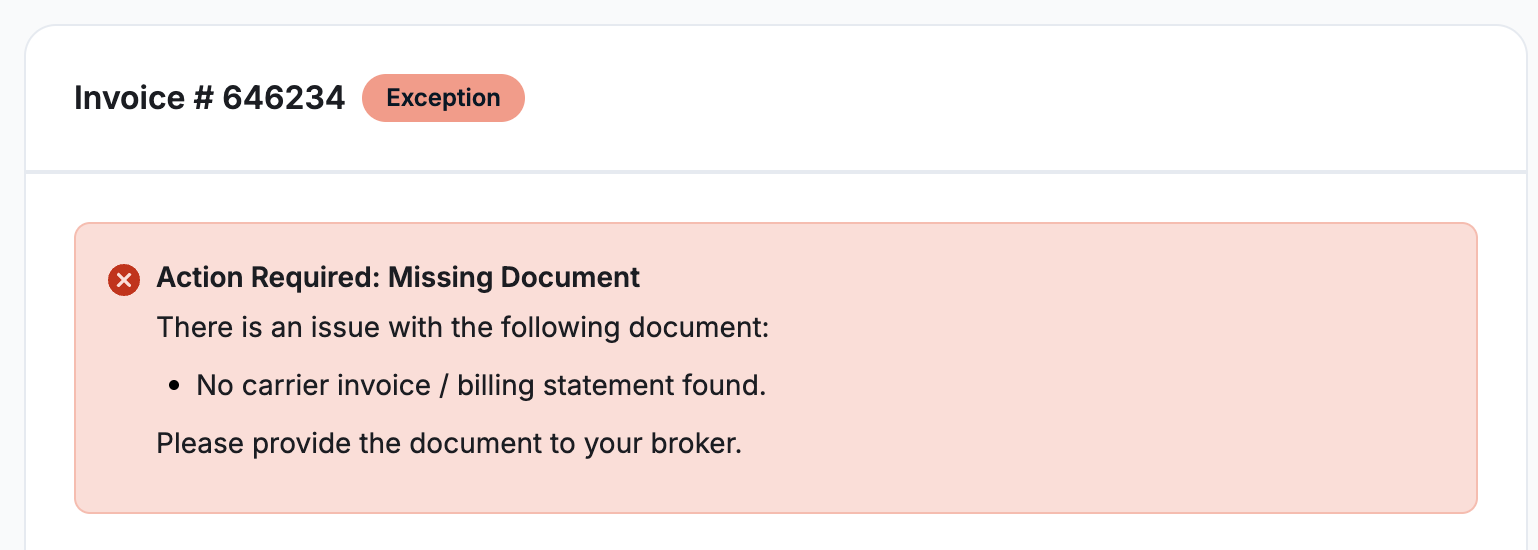
When they see a missing document alert, please work with your broker to submit the required document and resolve the exception.
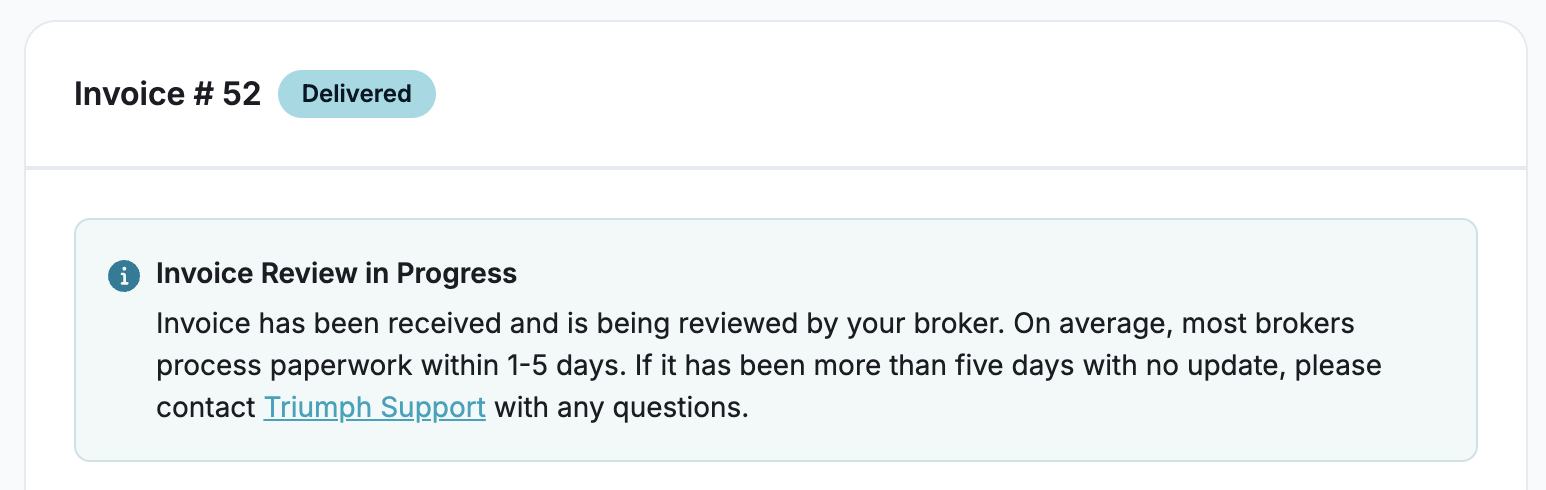
Otherwise, if the paperwork is still in process or there is an upstream exception that does not require their action, the status will be "Delivered" and the carrier will see a notice that reads:
“Invoice has been received and is being reviewed by your broker. On average, most brokers process paperwork within 1-5 days. Check back in a few days for an update or contact your broker with any questionsTriumph support with any questions.”
Important notes
- Seeing paperwork in the portal confirms it has been received by the broker
- This does not change the broker’s audit or approval timeline
- If paperwork is still under review, no further action is required unless indicated by an "Exception" status.
- Carriers will only see updates to their paperwork after their Triumph Payments Portal account was registered.
Was this article helpful?
That’s Great!
Thank you for your feedback
Sorry! We couldn't be helpful
Thank you for your feedback
Feedback sent
We appreciate your effort and will try to fix the article